Carousel
Carousels are a widget that allows to horizontally scroll / click / swipe through answer options. Each answer option can contain an image or icon and text.
-
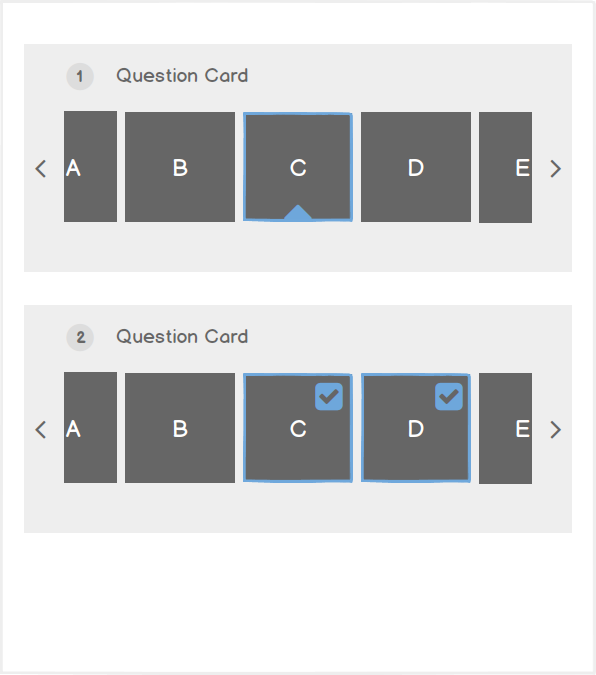
Above: Carousel with singleselect answer option. Below: Carousel with multiselect answer option.
Definition
Carousels can be used as singleselect or multiselect answer options on a question card. They combine an image or icon wih an optional answer option label. The Carousel is responsive and has an intuitive behavior also on smaller displays.
- Mood-image with answer option label works as a singleselect or multiselect on all display sizes.
- Click and swipe: intuitive drag / swipe behavior on mobile, but also clickable next/previous buttons
- The selected answer option stays visible on desktop and gets centrally aligned on mobile devices
- Dynamic animation: overflow scrolling and snap scrolling in the carousel
- Carousels and their images have a dynamic behavior like any other UI element or widget in product guides.
Other Use Cases
Carousels can also be used in combination with tab-box containers to select the tabulator for which further content is displayed. This can be helpful in responsive UIs to e.g. show explanation content for a variety of answer options.
Documentation
To optimize the user experience with your images and photos, please consider our detailed documentation about image sizes, resolutions and technical details.
-
Evaluation
Pictures are more emotional and intuitive than words and the user often finds it easier to select by images than by description. The Carousel with dynamic selection options feels intuitive on small display sizes, and it is a very nice way to browse through many answer options.
Carousels are especially great in Longpagers: The Longpager has vertical orientation, and it thus is very intuitive to horizontallybrowse through the answer options.
On the other hand, Carousels have a pretty complex interaction behavior (e.g. "show next set of carousel items" upon click or swipe; swipe acceleration and stopping behaviour), and on old smartphone devices they may not be perfectly smooth due to higher requirements to the CPU performance.Limitations
- don't use too many answer options (e.g. not more than 10 to 15)
- be careful with too large images on mobile devices - low CPU performance of older devices and poor GSM connection can slow down the user experience if too large images / resolutions selected
-
We plan making the following enhancements to this component:
- dynamic animation: enhance the animation of overflow scrolling and snap scrolling
- performance on mobile phones: enhance the performance on (older) mobile phones with less CPU / GPU power
-
Singleselect and multiselect Carousels at myToys
:quality(80):format(png)/https://www.excentos.com/images/documentation/ui-portfolio/examples/carousel.png)
Question cards with singleselect and multiselect Carousels with responsive behavior
{module Link myToys Geschenkefinder}myToys Geschenkefinder{module Link Closingtag}
